리액트 AWS S3 배포 및 온프레미스 Backend
리액트 AWS S3 배포 및 온프레미스 Backend — #리액트 #s3 #AWSS3 s3 배포 (매우 쉬움) 리액트 프로젝트를 S3로 배포하기전 사전 준비 리액트 빌드 ...
#DevOps/cloudOps#Naver Blog
#리액트 #s3 #AWSS3
s3 배포 (매우 쉬움)
리액트 프로젝트를 S3로 배포하기전 사전 준비
- 리액트 빌드 명령어
npm run build
2. AWS 사전 셋팅
                                    AWS S3 버킷 생성 -> 정적 웹 호스팅 Enable -> Public Access block 해제 -> Policy 생성

# Policy 예시
  {
    "Version": "2012-10-17",
    "Statement": [
      {
        "Sid": "PublicReadGetObject",
        "Effect": "Allow",
        "Principal": "*",
        "Action": "s3:GetObject",
        "Resource": "arn:aws:s3:::your-bucket-name/*"
      }
    ]
  }

이후 Object에 dist 폴더의 모든 파일 업로드
* CLI 명령어:  aws s3 sync dist/ s3://your-bucket-name --delete
3. 배포 확인
                                    버킷 선택 - 속성 - 정적 웹호스팅 endpoint 확인

ex) http://marketing-web-app.s3-website.ap-northeast-2.amazonaws.com/
AWS S3와 온프레미스 백엔드 연결
1. 환경변수 분리
로컬 테스트 환경과 배포 환경을 분리해서 사용합니다.
- 왜냐하면 Backend endpoint가 다르기 때문...
                                    # .env 파일을 분리하면 된다.

.env.development
.env.production

# npm run 명령어 (Vite가 알아서 인식한다)
npm run dev -> .env.development
npm run build -> .env.production
2. 온프레미스 서버 endpoint
내 컴퓨터 ip:port로 등록
                                    랜선 직접사용시 : ipcofig -> ip주소 찾기
윈도우 방화벽 설정: 서비스 port열기
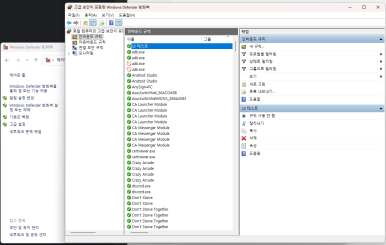
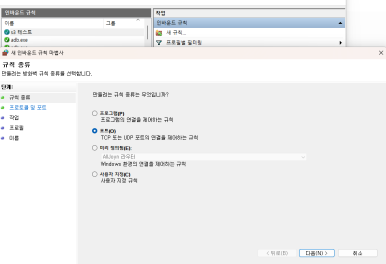
[윈도우 Defender]- [고급설정] - [인바운드 규칙생성] - [TCP:port]
3. CORS 오류 해결
                                    Access to XMLHttpRequest at 'http://ip:port/endpoint' from origin
'http://marketing-web-app.s3-website.ap-northeast-2.amazonaws.com' has been blocked by CORS policy: No 'Access-Control-Allow-Origin' header is
present on the requested resource.
원인: 프론트 서버에서 CORS allow 설정을 등록해야합니다.
                                    @Configuration
class WebCorsConfig: WebMvcConfigurer {

    override fun addCorsMappings(registry: CorsRegistry) {
        registry.addMapping("/**")
            .allowedOrigins(
                "http://localhost:5173",  // Vite 기본 포트
                "http://localhost:5174",   // 추가 포트
                "http://marketing-web-app.s3-website.ap-northeast-2.amazonaws.com" //s3 web hosting
            )
            .allowedMethods("GET", "POST", "PUT", "DELETE", "OPTIONS", "PATCH")
            .allowCredentials(true)
            .allowedHeaders("*")
            .exposedHeaders("Authorization")
            .maxAge(3000)
    }
}